VSCode/Cursor extension
The gohawk extension shows findings as you type, with the steps that lead to each one. It works in VS Code and Cursor, beside the official Go extension.
Install
Search for gohawk in the Extensions view and install it. VSCodium and other editors that use Open VSX can install it the same way.
The gohawk binary is included. You only need a supported Go command on your
PATH.
Open a Go file. The status bar shows gohawk and the result of the last
check.
Read a finding
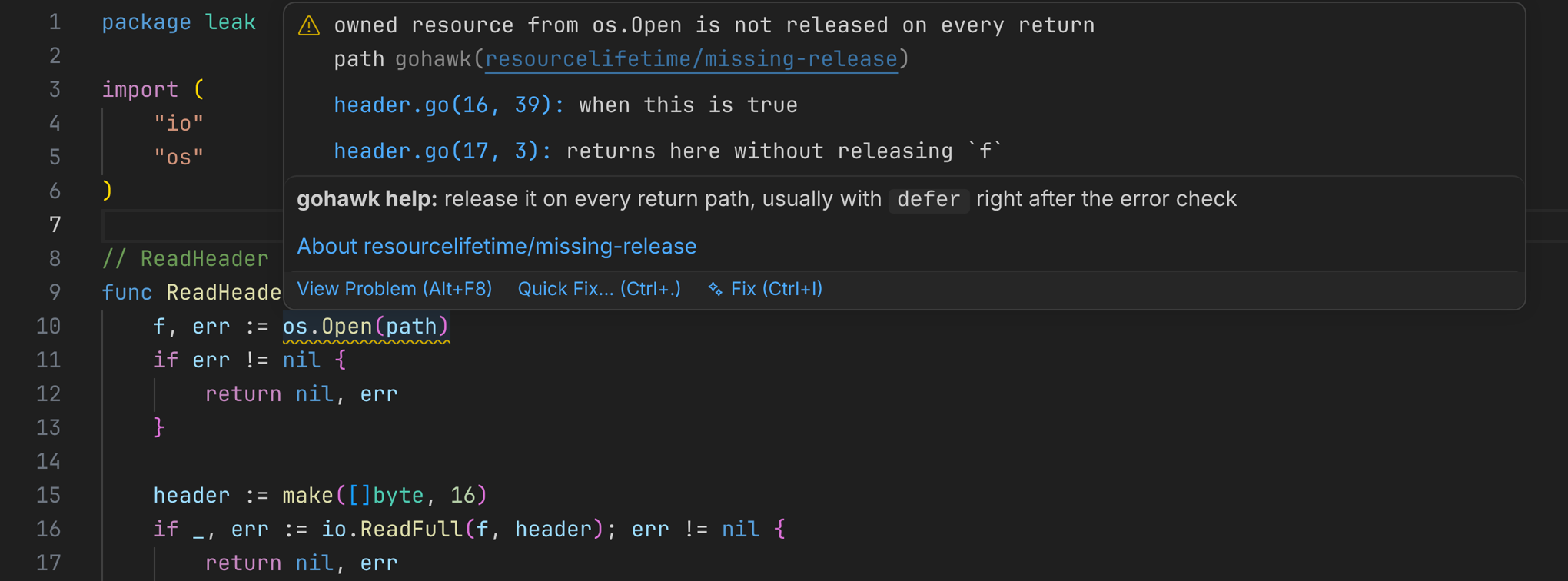
A finding is underlined where the problem starts, such as the call that opens a file. Hover it to see the message, the steps that lead to the problem, and the usual fix. The Problems panel lists the same steps.
Follow the path
Put the cursor on a finding, open the lightbulb menu (Ctrl+., or Cmd+. on
a Mac), and pick Step through the reported path. The rest of the code
dims and each step is numbered. Tab and Shift+Tab move between steps;
Esc exits.
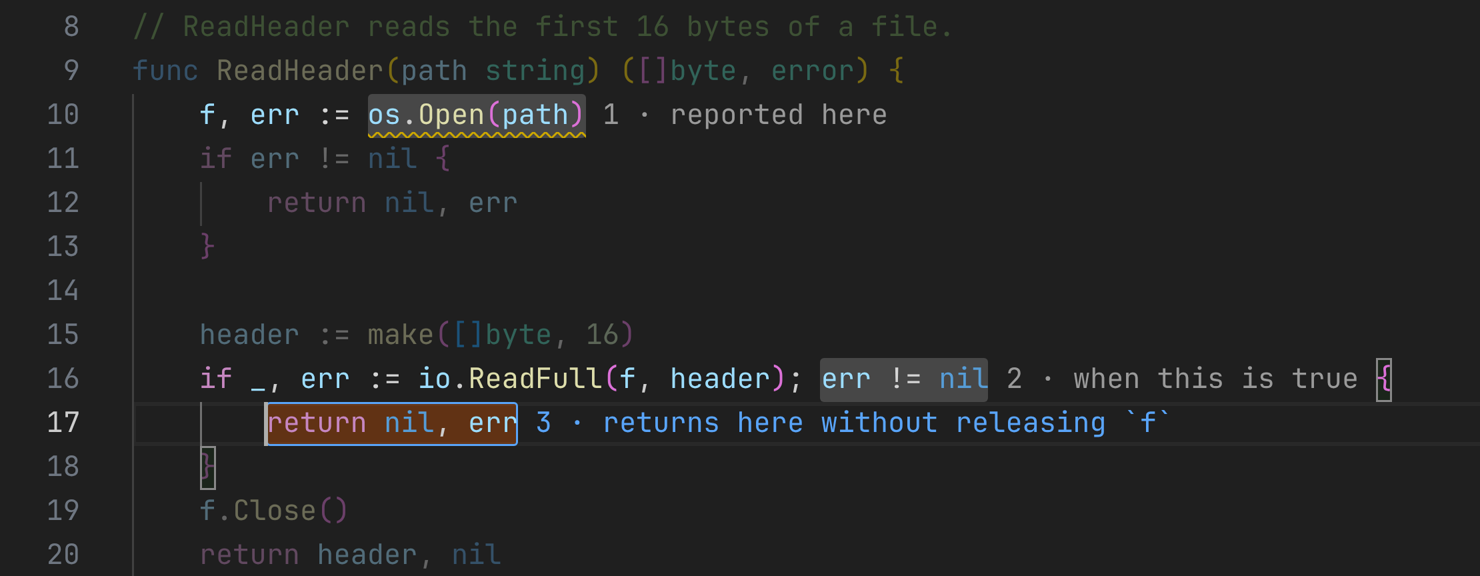
gohawk does not change your code, so the menu has no automatic fix.
When checks run
gohawk checks the package you are editing about a second after you stop typing. It reads unsaved changes, so you do not need to save. It then checks the packages that use that package, because a change in one can add or remove findings in another.
The status bar shows the result:
| Status | Meaning |
|---|---|
no findings |
The last check found nothing. |
2 findings |
See the Problems panel. |
checking… 1m20s |
A check is running. |
still checking… |
Packages that use the one you edited are being checked. |
build failed in server |
The package does not compile. Earlier findings stay until it does. |
check of server stopped |
A check used too much time or memory. |
not checked |
A test file, or a file outside your workspace or module. |
Hover the status for details. Run gohawk: Show Output for a log of each check.
Large projects
The first check in a project also analyzes its dependencies. On a very large project this takes a few minutes, once.
If checks feel slow while you type, set gohawk.run to onSave.
Settings
| Setting | Default | Meaning |
|---|---|---|
gohawk.run |
onPause |
Check after you stop typing, onSave, or only on request (manual). |
gohawk.debounce |
750 |
Milliseconds to wait after the last keystroke. |
gohawk.scope |
packageThenImporters |
Also check packages that use the edited one, only the edited package, or the whole module on save (workspaceOnSave). |
gohawk.importerLimit |
50 |
When more packages than this use the edited one, check only the ones you have open. |
gohawk.experimental |
false |
Include experimental checks. |
gohawk.memoryLimit |
2GiB |
Stop a check that uses more memory than this. |
gohawk.maxParallel |
2 |
Packages analyzed at once. |
gohawk.timeout |
60 |
Stop a check that spends this many seconds on one package. |
gohawk.path |
empty | Use your own gohawk binary. |
What is not checked
- Test files (
_test.go). - Files outside the folder you opened, such as a dependency you jumped into.
- Experimental checks, unless you turn them on.
Other editors
The extension is a client for gohawk lsp, a Language Server Protocol server
on standard input and output. Any editor with a language client can start it
for Go files and show the same findings. Path stepping and the status bar are
specific to the extension.
If something looks wrong
gohawk: not installed. Reinstall the extension, or setgohawk.path.- No finding where you expect one. Check the status bar: it says when a package does not compile or a check was stopped.
- Everything is slow. Run gohawk: Show Output to see each check’s time and memory.